Administer it from anywhere on the network. Expose it to none of it.
A hardened Linux AI workstation, administered only from authorized devices on a private network — key-based access, a deny-by-default firewall, and no SSH surface exposed to the public internet.
Private Infrastructure Project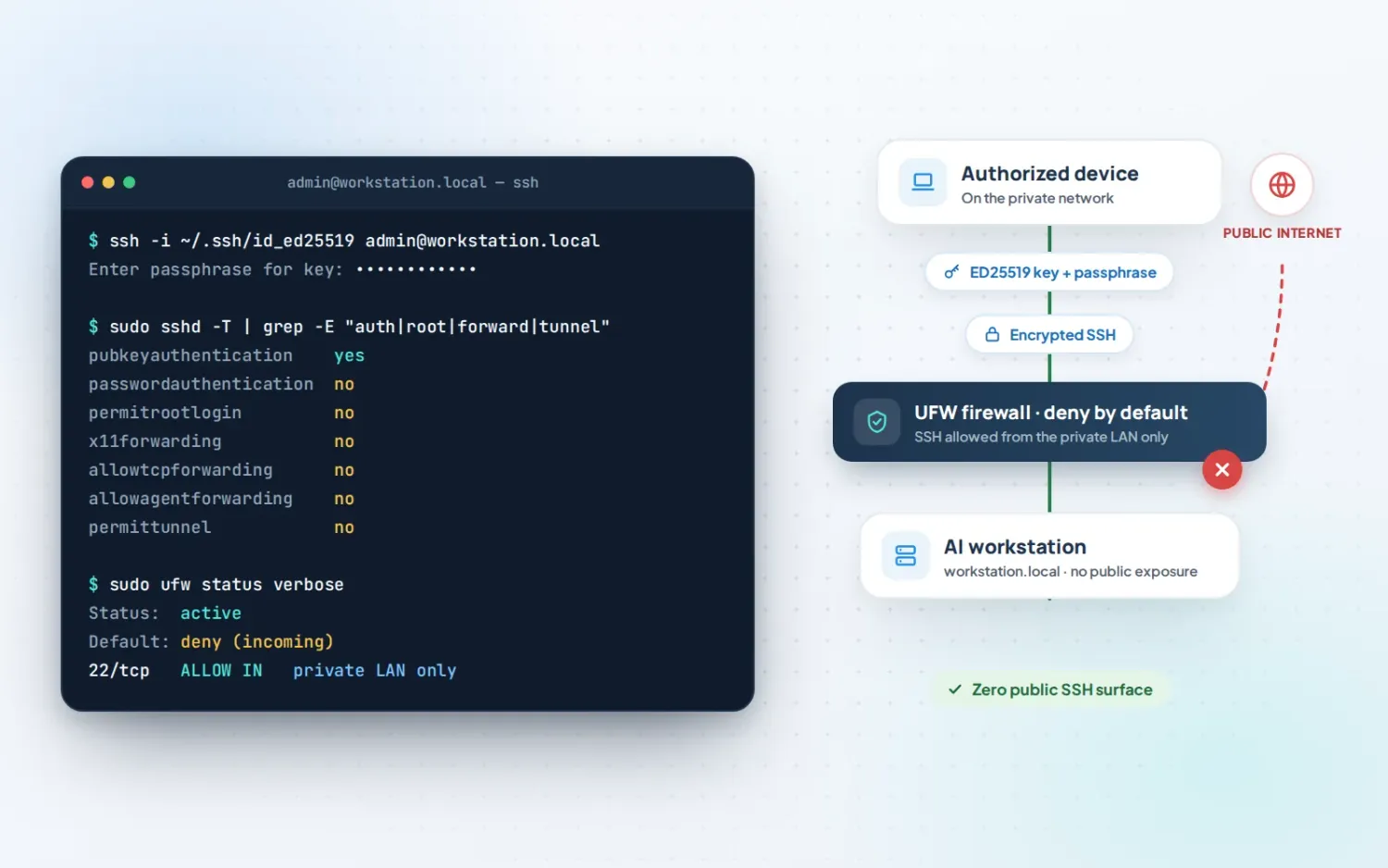
The Challenge
Remote administration, without a remote attack surface.
The workstation needed to be administrable from another device on the network — without opening SSH to the internet, relying on passwords, or leaving any of the default remote-access conveniences (forwarding, tunneling) enabled that widen the attack surface for no real benefit here.
Architecture
Access & hardening layers
Workstation
(passphrase)
SSH
Firewall (UFW)
Workstation
How It Works
Every layer has to agree before a session opens.
An authorized device on the private network connects using a passphrase-protected ED25519 key over encrypted SSH. The firewall denies all incoming traffic by default and allows SSH only from the private LAN — discovered by .local hostname rather than a public address. Nothing about this setup is reachable from outside the network, by design.
Security & Control Architecture
Hardening, layer by layer
- ED25519 key authentication, passphrase-protected
- Password SSH authentication disabled
- Root SSH login disabled
- X11 forwarding disabled
- TCP forwarding disabled
- Agent forwarding disabled
- SSH tunnel features disabled
- UFW active, incoming traffic denied by default
- SSH permitted only from the private LAN
.localhostname discovery, no public exposure
Key Capabilities
Beyond access control
Performance cleanup
Stale browser and agent processes identified and cleared, freeing memory and reducing idle system load.
Process hygiene
Runaway or orphaned Hermes/Python processes brought under control as part of the same pass.
Infrastructure monitoring
Ongoing visibility into system load and resource use, not just a one-time cleanup.
LAN-only remote administration
Full administrative access from an authorized device, with zero public attack surface.
Tech Stack
Built on
Results / Outcome
Observed system measurements during cleanup
| Metric | Before | After |
|---|---|---|
| Stale browser daemons | 68 | 0 |
| Hermes / Python processes | ~85 | ~17 |
| RAM used | ~14 GB | ~10 GB |
| RAM available | ~17 GB | ~20 GB |
| System load (1-min) | ~1.18 | ~0.13 |
Observed system measurements during cleanup on this deployment — not guaranteed performance results.
"Security and performance aren't usually the same conversation. Here they were — cleaning up what didn't need to be running was also what closed the gaps that didn't need to be open."