Google Workspace Setup
Google Workspace Setup That Keeps Your Business in Sync
Professional email on your own domain, shared files, calendars and security, set up for you in one Google Workspace. We handle the technical parts, so your team signs in and gets to work.
- Setup from $295
- 14-day free Google trial
- English & Español
NYS Certified WBE · Hamptons, North Fork & New York City

Google Workspace set up for
- Sleek Painting
- I'M Painting Now
- RitmoFit XP
- Houston Work Vans
Read the case studies: I'M Painting NowHouston Work Vans
In plain words
What is Google Workspace setup?
Google Workspace setup connects your business domain to Google, so your team gets professional email (you@yourbusiness.com), shared Drive storage, calendars and video meetings under one secure account. A proper setup also adds the SPF, DKIM and DMARC records that help your email reach the inbox, turns on two-step verification, and gives each person the right access.
What This Fixes
- Emails scattered across accounts
- Files no one can find
- Calendars out of sync
- Team access confusion
- Messages landing in spam

What's Included
A Foundation of Efficiency.
We engineer a professional digital infrastructure that allows your team to collaborate without friction or security risks.

Email & Domain Infrastructure
Professional email accounts, aliases, DNS configuration, and security authentication. We ensure your domain is properly verified for maximum deliverability, authority, and inbox placement.
Drive Structure
Clean folder architecture, shared drives, and team access rules to stop file chaos once and for all.
Calendar Sync
Team calendars and appointment booking configuration to keep your schedule perfectly organized.
Team Onboarding
Strategic training sessions to ensure your entire team adopts the new system smoothly.
Productivity Tools
Docs, Sheets, and workflow templates custom-tailored to your specific business operations.
Security Oversight
Two-step verification, device protection, and user role permissions to keep your data locked down.
Ready to Scale?
Let's build your professional foundation today.
A Smooth Move to Workspace.
We handle the setup and the move in the background, so your team keeps working.
-
Plan
We map your domain, users, aliases and shared drives before anything changes.
-
Migrate
We move your existing email, folders and contacts in the background, then flip the switch.
-
Secure
We set up SPF, DKIM and DMARC, two-step verification and user permissions.
-
Onboard
Training sessions help your whole team adopt the new system smoothly.
Get Google Workspace through us.
Start a free 14-day trial with our link, save 10% on your first year, and let us set up your email, domain and security.
Start your free trial
Sign up with our link. The account is in your business's name from day one, and Google gives you 14 days to try it.
Get 10% off your first year
Ask us for your promotion code, then apply it when you sign up or before your trial ends.
Let us set it up
We connect your domain, create your users and addresses, and turn on SPF, DKIM, DMARC and two-step verification.

Setup pricing
- $295New business email setup, up to 3 users
- $25 per userEach extra user
- $150 per mailboxMoving existing email, calendar and contacts
- from $750Team setup: shared drives, groups, rules and training
Setup prices are for Alchemy Effect's services and don't include your Google Workspace subscription, which Google sells, bills and prices (see current pricing). The 10% code is for businesses new to Google Workspace, one code per business. We're part of the Google Workspace Referral Program and may earn a referral fee when you sign up through our link. It doesn't add to your cost.
Choosing a Plan
Which Google Workspace plan do you need?
Every Business plan includes email on your own domain, Gmail, Calendar, Drive, Docs, Meet and the Gemini app, for up to 300 users. The plans differ mainly in storage, meeting size and admin tools. Business Starter is the right start for most small teams, and you can upgrade later without moving your email.
-
Most small teams
Business Starter
Solo owners and small offices that need professional email and shared files.
$7 per user / month*
- Storage per user
- 30 GB
- Video meetings
- Up to 100 people
- Meeting recordings
- No
- Google Vault
- No
-
Business Standard
Teams that share large files or want to record their meetings.
$14 per user / month*
- Storage per user
- 2 TB
- Video meetings
- Up to 150 people
- Meeting recordings
- Yes
- Google Vault
- No
-
Business Plus
Businesses that need eDiscovery, legal holds and stronger device management.
$22 per user / month*
- Storage per user
- 5 TB
- Video meetings
- Up to 500 people
- Meeting recordings
- Yes
- Google Vault
- Yes
*Google's list prices in US dollars with a one-year commitment, as of November 2026. Flexible month-to-month plans cost more, Google sometimes runs limited-time offers, and Google can change its prices at any time. See Google's current pricing. Our setup prices are separate.

Who Sets It Up
Carolina Fuentes
Founder & Managing Member, Alchemy Effect
Alchemy Effect runs on Google Workspace too. Carolina has completed Google's Workspace training in data governance, Gemini in Gmail and core services, and works with you in English or Spanish, from planning to training your team.
 Data Governance
 Gemini in Gmail
 Core Services
Google Workspace setup: frequently asked questions.
Will I lose my existing emails during the move to Google?
Why do my emails often end up in people's spam folders?
Can't I just use a free @gmail.com account for my business?
Do I have to pay for a new user for "info@" or "sales@" addresses?
What happens if an employee leaves the company?
How much does Google Workspace setup cost?
Which Google Workspace plan should I choose?
How long does setup take?
Do I need a new domain name?
Is there a free trial?
Do you offer support in Spanish?
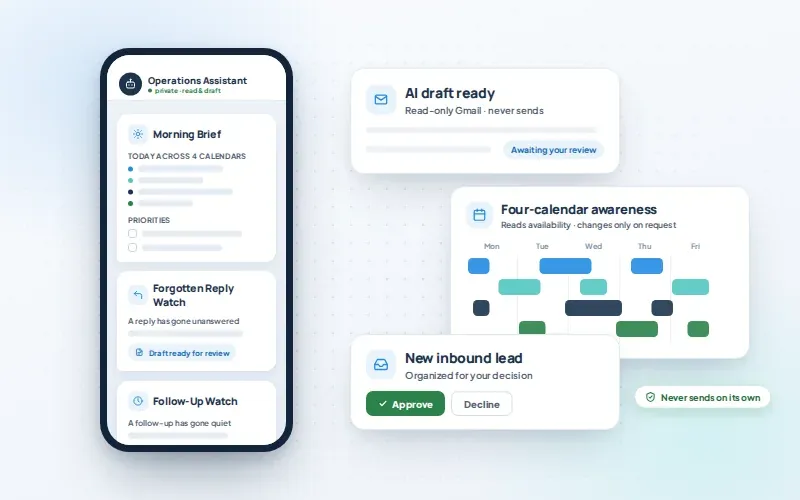
Let's get your business properly organized.
Stop fighting with your tools and start using them to grow. We'll build you a professional Workspace that keeps your team in sync.